Split mbox Files
Drag your .mbox file here or click to select
Safe and private - Files are processed locally
About
Free MBOX File Splitter Tool
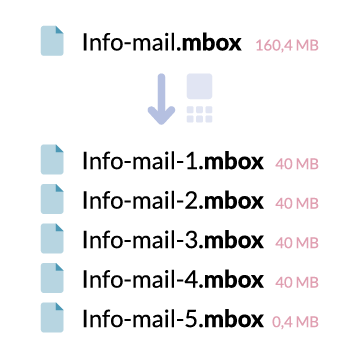
The free MBOX splitter tool is designed to split large MBOX email files into smaller, manageable parts directly in your browser.
Many email providers like Gmail, Outlook, and Yahoo limit the MBOX file size for email imports. Our MBOX file splitter solves this by:
✓ Splitting large MBOX files automatically without size limits
✓ Working completely offline - your email data never leaves your computer
✓ Supporting all email clients - Gmail, Thunderbird, Apple Mail, Outlook
Perfect for email migration, email backup splitting, and handling large email archive files. Split your MBOX files now!
Data Information
What happens to my E-Mails?
Absolutely nothing!
We split .mbox files entirely on your computer using local CPU and disk I/O. No file contents are uploaded or sent to our servers. Your data never leaves your device.
An internet call is only used to sign in and sync your quota, never to transfer your data.
Story of mbox splitter
Why mbox-splitter.com exists
I have many domains and have been with a reputable hosting provider here in Germany for years. Strato was the standard hosting provider for me. Cheap and sufficient. However, I always had problems with the speed of my websites and the websites of my customers. I did everything to speed up the website (compress images, compress JS etc.) but still this didn't change the speed of the websites too much. As CMS I often use Wordpress, because you can easily and super fast create websites with it.
At some point I came across the hosting provider 1blu.de through a customer of mine. 1blu offers a performance package, where a high-end NVMe-SSD hard drive ensures that you have ultra-fast access to databases and files. I tried it out and was pleasantly surprised. The website was much faster than usual. I started to move some domains from Strato to 1blu. Here, of course, I had to move the e-mail address as well. I had to create the e-mails of the domain I want to move at 1blu and then export the e-mails at Strato and import them at 1blu. I exported the e-mails through the Strato webmailer by selecting all of them and then exporting them as an .mbox file. The resulting file was 450.5 mb in size. I didn't think anything of it and logged into 1blu webmailer with my new email address to import them. It didn't work and I saw as error message: "There is only a maximum of 40 mb allowed".
This frustrated me enormously. I didn't want to make countless small exports. So I opened the .mbox file, saw the simple structure and wrote a script that splits the large file according to a maximum size. And here we are: I want to share this script and this possibility with the world.
Instruction
How it works
Export e-mails as .mbox file
Depending on the e-mail program, the export is automatic. With Apple Mail, the entire mailbox is exported as an .mbox file. With Thunderbird or Outlook it is different. Here we explain the export via Apple Mail:
- Open Mail on your Mac and select your mailbox.
- In the menu bar, select "Mailbox" → "Export Mailbox".
- Select a destination folder.
- Done! Depending on the size, the export may take a few minutes. The file size in the Finder will increase until the process is complete.
How do I split my mbox file?
Upload your file above, enter the desired size for the split and a name for the destination files. Then click on "Split" - that's all. Your files will be split automatically.
History of mbox
Mbox (Mailbox) is a file format for storing multiple e-mails in a single file. It was first introduced in the fifth edition of Unix. All messages are concatenated as plain text, with each message starting with the four characters "From ". For more details see Wikipedia.
Founder
That's me

"Ever since I was 21, I have been developing my own projects with full enthusiasm. When I have an idea or a goal in my head, it doesn't let me go until I have implemented it. Naming a problem is right. Working on it is important. Solving it is crucial."
Meet MBOX Viewer
View, manage, and export your MBOX files directly in your browser - completely free and unlimited

MBOX Viewer
The perfect companion to our MBOX Splitter. View and manage your email archives without importing them into any email client.
No File Size Limits
Process MBOX files of any size - even hundreds of gigabytes. Everything runs locally in your browser.
100% Private & Secure
Your emails never leave your computer. All processing happens locally in your browser - no uploads, no cloud storage.
Edit & Export
Delete unwanted emails, download attachments, and export a cleaned-up version of your MBOX file.
💡 Pro Tip: Use MBOX Splitter to divide large archives, then MBOX Viewer to manage and clean them up!
Let's talk
Contact me
kontakt@mergim-rexha.de
Send a message+49 (0) 1774 950 544
Call now